
Custom-built software
ElementTurn Professional
One system built around how your company actually runs, and made for that company alone.
Why custom
The system fits the company, not the other way around
Your work already runs on spreadsheets, whiteboards and email, because those bend to fit how your company works. Off-the-shelf software asks the company to fit it instead. We build the system around your departments, equipment, shifts, words and approvals, and bring the areas below into one product.
Area 1
Operations
The daily running of the work: the huddle, the schedule, readiness, shifts and handovers.
The morning meeting runs from a whiteboard or a slide deck. The schedule is a spreadsheet passed around by email, each department keeps its own tracker, and the shift log and handover email carry the rest.
One plan for the work, the equipment and the people. Each department's checks sit on the job they belong to, shifts are planned and closed in the same place, and the meeting screen is ready before the room arrives.
An example: Daily Board
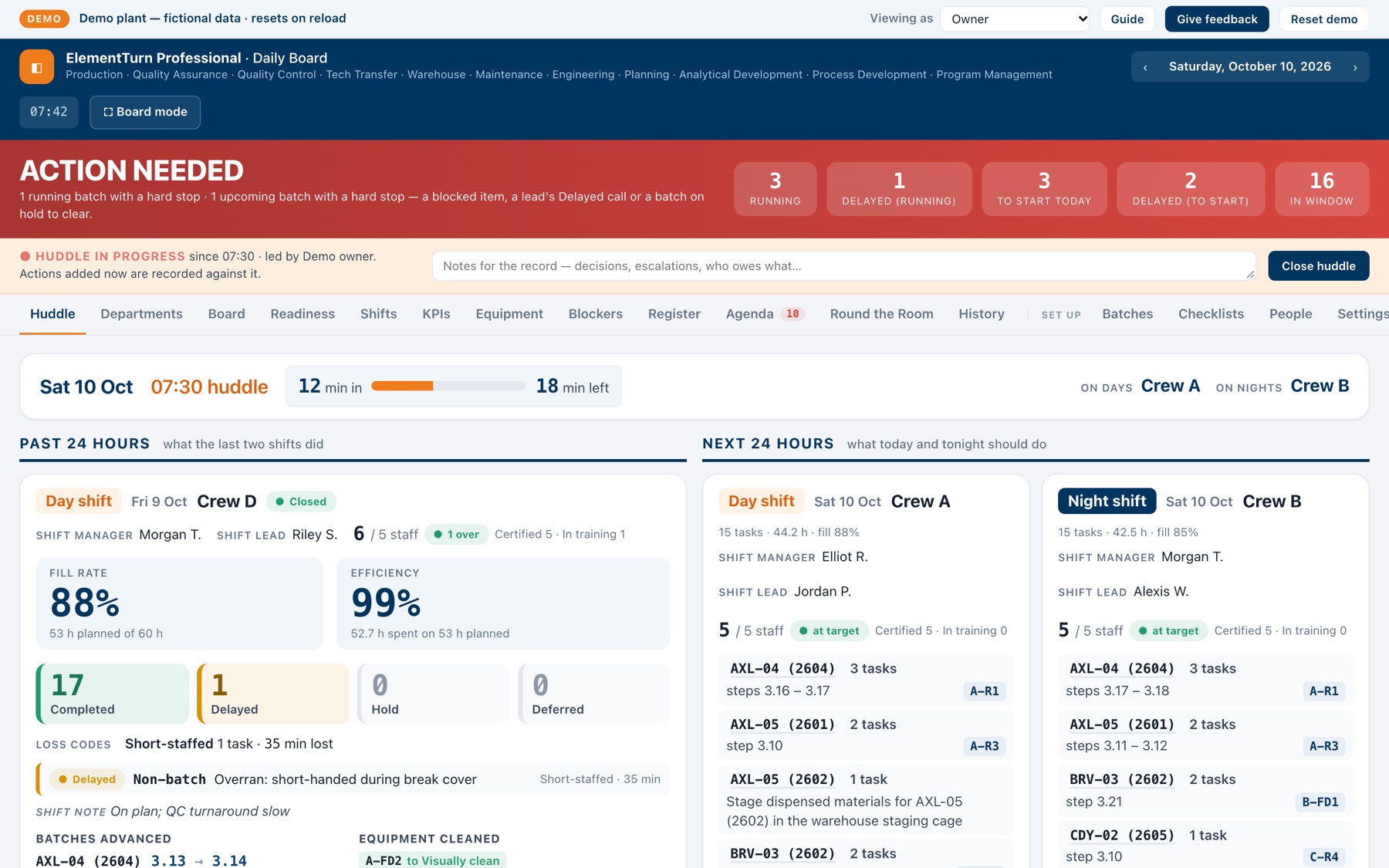
Daily Board is an Operations build for a fictional plant: the huddle, the equipment timeline, readiness and shifts, all on one screen the room reads together.
- Your departments and the readiness checks each one owns
- Your equipment, buildings and cleaning steps, in your own words
- Your crews, shift pattern and handover times
- Your loss codes, task categories and targets
- Your current schedule, brought in the way you keep it today
Area 2
Capital Projects
The projects that change the plant or the business: what is planned, what it costs and who has signed off.
The project list, budgets against actuals, milestones and approvals usually live in a set of spreadsheets, each kept by a different person. The status gets rebuilt by hand before every review.
One list of projects, each carrying its budget, spend to date, milestones and the approvals it needs, in the stages your company uses. The review reads the status from the record instead of retyping it.
- Your project stages and the gates between them
- Your approval chain and sign-off limits
- Your budget categories and cost codes
- Your review cycle and the reports it needs
- The trackers you keep now, brought in as the starting point
Area 3
KPI Dashboards
The numbers a team already keeps, and the meetings that review them.
Each number is kept in its own file. Before the review, someone copies them into a report or a slide by hand, and the definitions drift from one month to the next.
Your numbers gathered on one screen, using your company's definitions and targets, instead of rebuilt by hand. Where another area of the system already holds the record, the number comes straight from it.
- The measures you already track, defined your way
- Your targets and the thresholds that flag a number
- Where each number comes from today
- Who sees which screen: the floor TV, the shift lead, management
- How often each number refreshes
How we build it for you
Find · Build · Ship
The same method behind everything NDNS makes, applied to your company.
Find
Watch the work as it is actually done, and read the spreadsheets, trackers and emails it runs on today.
Build
Configure and build the system to your areas, data and words, importing what you already keep.
Ship
Run it alongside your current method, adjust what does not fit, switch over, then keep improving it as your team asks.
Want someone embedded with your team for the rollout? That is forward-deployed engineering.
Start with the area that slows you down
Tell us how the work runs today. You will get a straight answer about what a build would take.